10xTravel is part of an affiliate sales network and receives compensation for sending traffic to partner sites, such as CreditCards.com. This site may earn compensation when a customer clicks on a link, when an application is approved, or when an account is opened. This compensation may impact how and where links appear on this site. This site does not include all financial companies or all available financial offers. Terms apply to American Express benefits and offers. Enrollment may be required for select American Express benefits and offers. Visit americanexpress.com to learn more. All values of Membership Rewards are assigned based on the assumption, experience and opinions of the 10xTravel team and represent an estimate and not an actual value of points. Estimated value is not a fixed value and may not be the typical value enjoyed by card members.
Note: Some of the offers mentioned below may have changed or may no longer be available. The content on this page is accurate as of the posting date; however, some of our partner offers may have expired. You can view current offers here.
The Chase Freedom Flex® has an unusually strong dining opportunity for the fourth quarter of 2026: eligible purchases can earn as much as 17% cash back through December 31.
By the end of this article, you’ll know exactly how the 17% on dining actually stacks together and the precise steps to make sure those points actually land in your account, not just the headline number.
What’s new this quarter
There’s a lot packed into this refresh, so let’s get right into it. If you’ve been carrying the Freedom Flex in your wallet mostly out of habit, this is the moment to actually pay attention to what changed.
First up, and honestly overdue: Chase finally killed the foreign transaction fee on this card. If you’ve ever pulled out a different card at a restaurant overseas because the Freedom Flex was quietly taking a cut on every swipe, that’s no longer a reason to leave it home.
There’s also a limited-time welcome offer worth knowing about. New cardholders can earn a $250 bonus, paid out as points rather than cash back, so keep that in mind when you’re doing the math on this one, after they spend $500 on purchases within the first 3 months of opening the account.
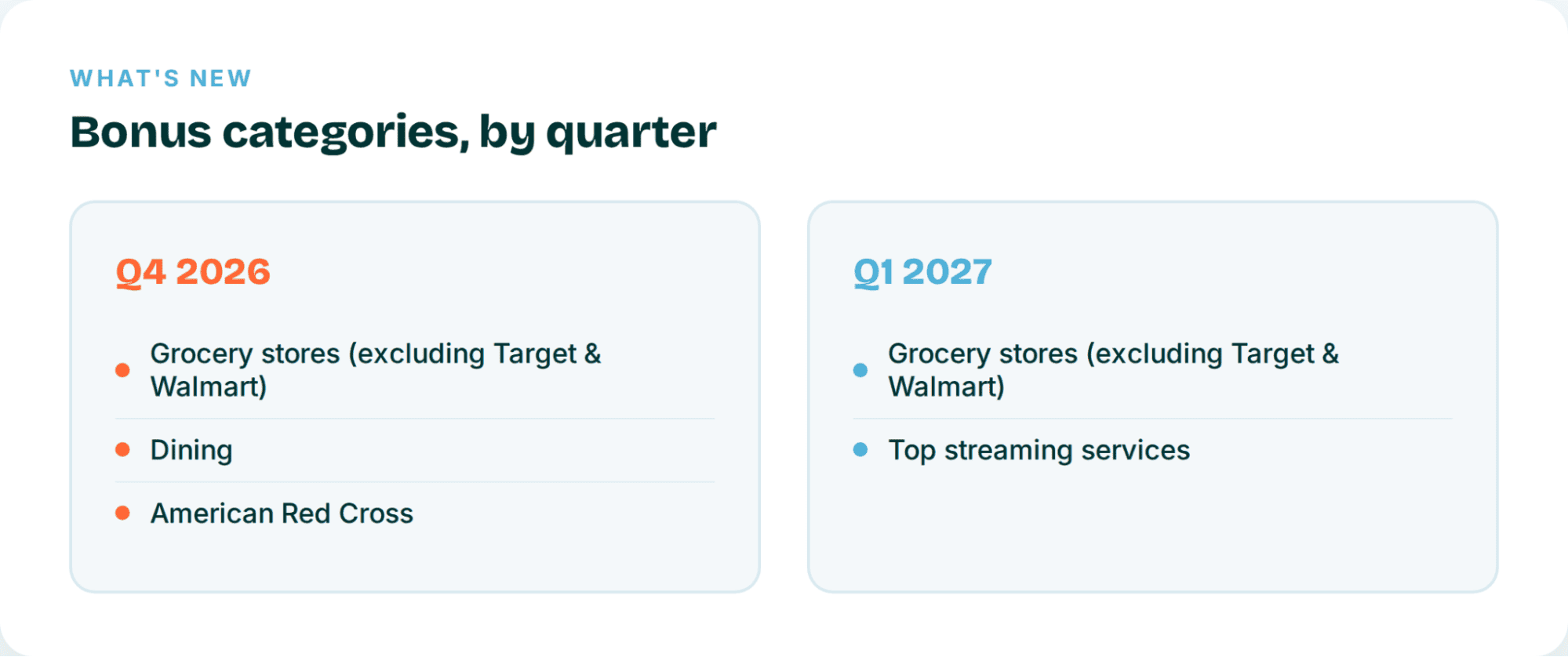
And maybe the most useful change for people who actually optimize their spending: Chase is now telling you your bonus categories a full quarter in advance instead of dropping them right before the quarter starts. That means you can actually plan around them instead of scrambling to activate at the last minute.
Everything you already know and like about the Freedom Flex is still exactly where you left it.
You’re still getting 5% back on whatever quarterly category is activated (up to $1,500 in purchases each quarter), 5% when you book travel through Chase Travel, and a very solid 3% on dining, and that includes takeout and eligible delivery, not just sit-down meals. Drugstore purchases still earn 3% as well, and everything else that doesn’t fall into a bonus category earns a flat 1%. And yes, it’s still a $0 annual fee card, which is part of why it’s so easy to justify keeping in rotation.
The 17X dining stack, explained
Here’s where things get genuinely exciting, so bear with the math for a second because it’s worth understanding rather than just taking our word for it.
Dining happens to be this quarter’s activated bonus category, which means if you’re someone who eats out even semi-regularly, Q4 2026 is shaping up to be a very good time to be a Freedom Flex holder. Stack every applicable bonus together and you can earn 17% on dining spend. Not 18%, which is the number you’d land on if you just added 3%, 5%, and 10% at face value, and we want to walk through exactly why that is so you’re not left second-guessing the math later.
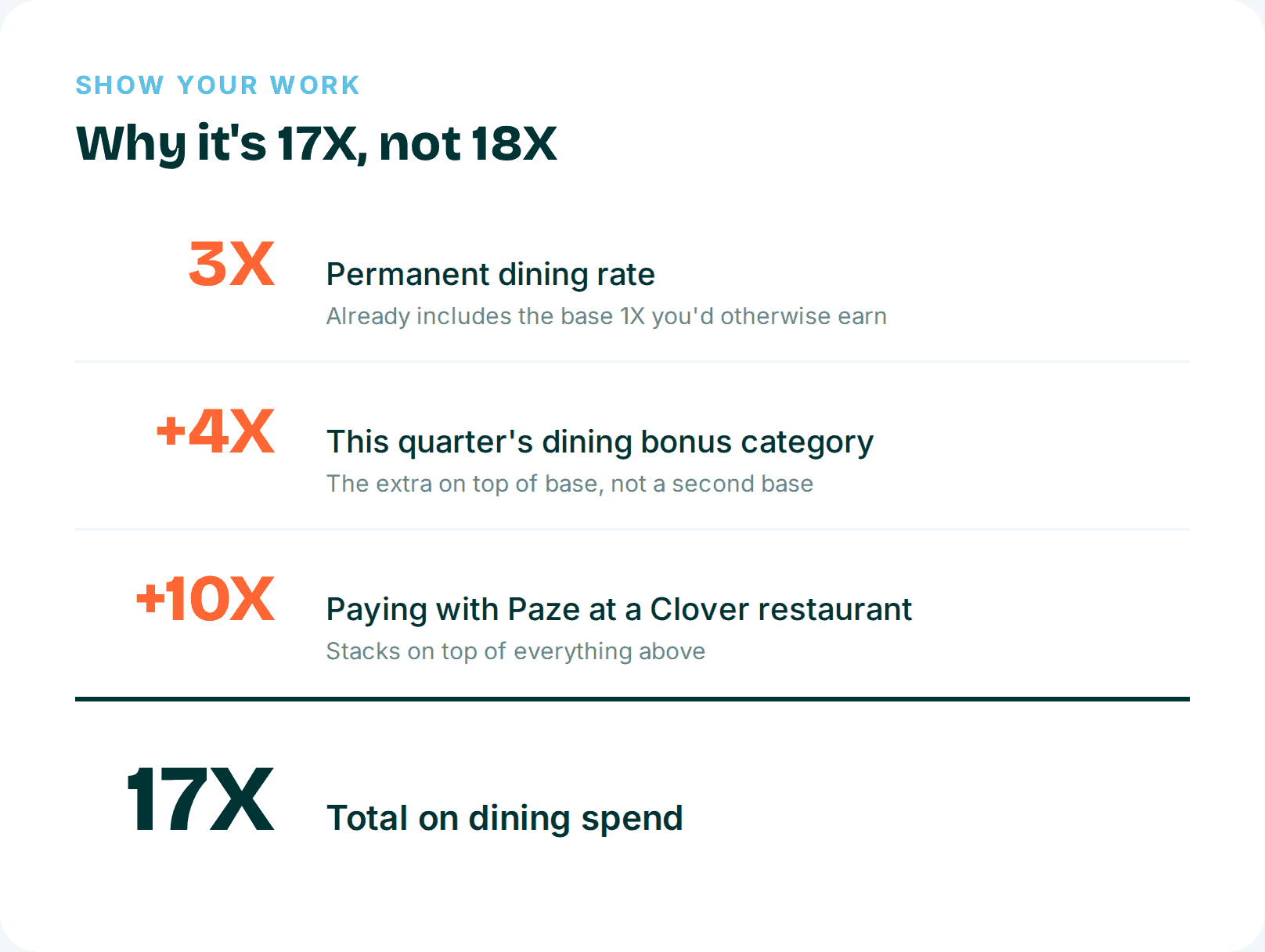
So why isn’t it 18%? The quarterly bonus category is advertised as 5%, but that 5% already has a base 1% baked into it. Dining’s permanent 3% rate is also an all-in rate that already contains its own base 1%. If you added the full 5% on top of the 3%, you’d be counting that base twice, which Chase doesn’t let you do. So only the bonus category’s extra 4% actually applies here. Add it up: 3% plus 4% plus 10%, and you land on 17%.
There’s a cap worth knowing about too. The Q4 bonus rate applies to up to $1,500 in combined spending across all three Q4 categories, groceries, dining, and eligible Red Cross donations, not $1,500 for each one on its own. The Paze bonus carries a separate cap: up to $1,500 in qualifying purchases per month. Put real numbers to it and the stack gets easier to picture. At the full 17%, $100 of qualifying dining spend earns 1,700 Ultimate Rewards points, and running the entire $1,500 quarterly allowance through the complete stack would earn 25,500 points.
Because groceries, dining, and Red Cross donations all draw from that same $1,500 bucket, it’s worth being deliberate about which spending you route through the Freedom Flex this quarter. If maximizing the 17% dining stack is the priority, putting Q4 grocery spending on a different card preserves more of that allowance for qualifying restaurant purchases. And Paze is limited to participating online merchants, with merchant coding still mattering for the dining bonus to apply, so don’t assume every Clover restaurant or every order will qualify.
What Paze and Clover actually are
If you’ve never heard of Paze or Clover, you need to getting familiar with both if you want to actually capture this rate.
Paze is a newer online checkout option built by the banks themselves, essentially their answer to Apple Pay and PayPal. Clover, meanwhile, is one of the most common point-of-sale systems restaurants in the U.S. use, similar to Toast if you’ve heard of that one. The reason the two matter together is that Clover’s online ordering checkout happens to support Paze, and it does so at a surprising number of places, somewhere north of 35,000 merchants at last count, including a handful of non-restaurant businesses too.
How to pay with Paze at a Clover restaurant
Once you know what you’re looking for, actually using this stack is pretty painless. Just a heads up before you start: this assumes you’ve already activated the Q4 dining bonus category in your Chase account, and that you’ve also activated your cards in Paze beforehand, so take care of both of those first if you haven’t.
- Find a participating Clover restaurant. There are roughly 35,500 locations to choose from, including a small number of non-restaurant merchants mixed in.
- Add your items to the cart on that restaurant’s Clover online ordering page, just like you normally would.
- When you get to checkout, look for Paze as a payment option and select whichever eligible card you want to use for the bill.
One thing to watch for: if Paze isn’t showing up as an option, double check that you’re not using the Clover app. For reasons that aren’t entirely clear, this only works through a desktop browser or a mobile website, never the app itself.
Stack another layer: dining rewards programs
Once you’ve got the Paze and Chase stack down, there’s actually one more layer you can add on top if you’re willing to do a little extra setup. A couple of dining rewards programs overlap with Clover restaurants, and they don’t care that you’re already stacking bonuses elsewhere.
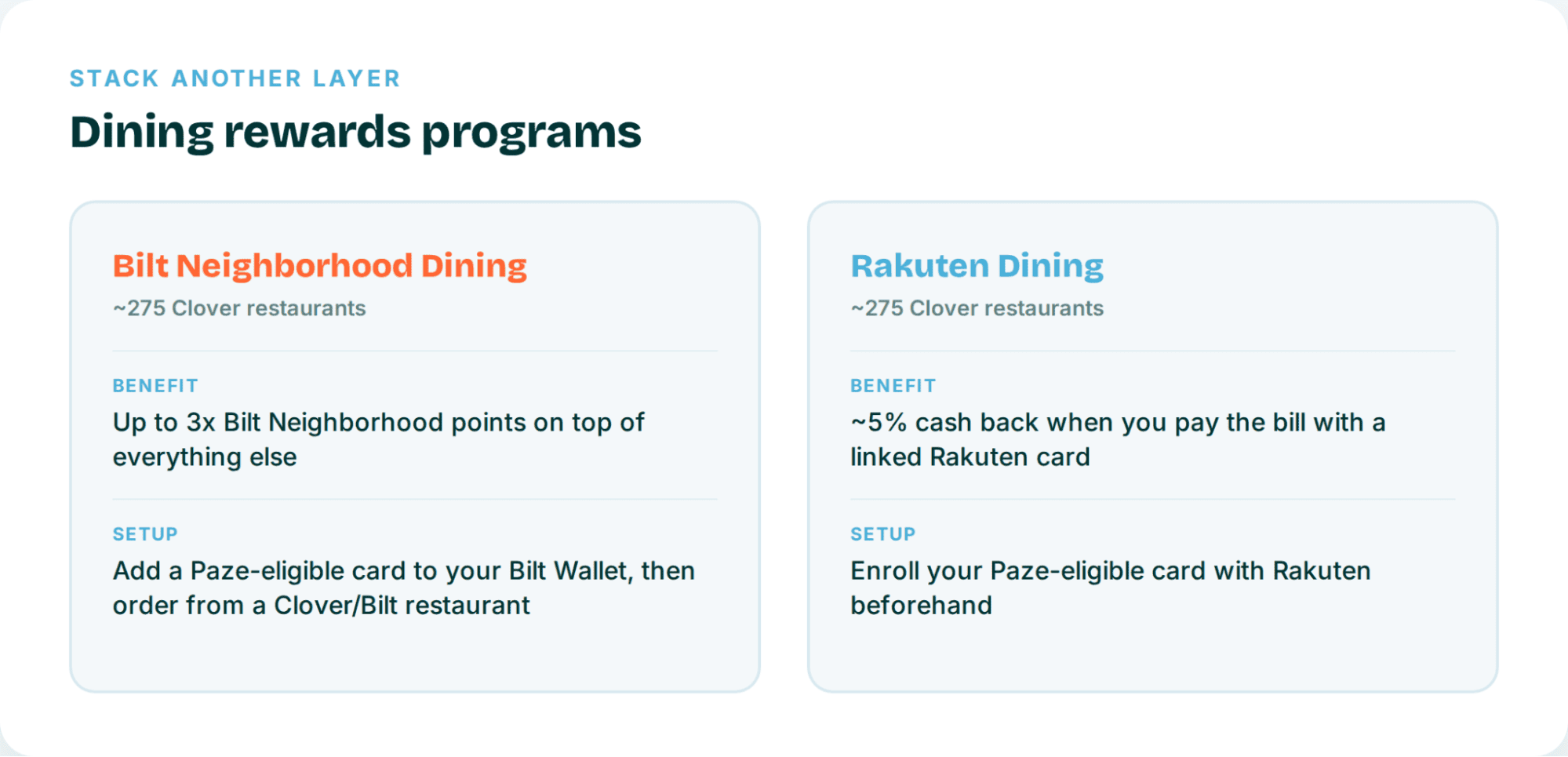
Neither program covers a massive share of Clover’s restaurant footprint yet, but if one happens to show up where you’re already eating, there’s no reason to leave it on the table.
Common pitfalls and checkout glitches
We’d be doing you a disservice if we didn’t mention that this checkout flow has a few rough edges. None of these are dealbreakers, but knowing about them ahead of time will save you some frustration mid-order.
- Don’t use the Clover app, seriously. You will never see Paze show up as a checkout method there, no matter how many times you refresh. Stick to a desktop browser or your phone’s mobile browser instead.
- If the Paze offer banner isn’t showing up for you, try entering your card’s CVV first. That alone seems to fix it more often than you’d expect.
- If you’re on an iPhone, checkout tends to throw an error right at the Paze step, and nobody seems to fully know why. Oddly enough, this doesn’t happen on a computer or an Android phone.
- Watch out for Clover-issued gift cards sitting in your cart. If one’s in there for that restaurant, it’ll block Paze at checkout, so pull it out before you try to pay.
- Try to space out your orders. Doing several Paze and Clover orders in the same day can trigger rate limiting, so give it 24 to 48 hours between orders if you’re planning to use this more than once.
Find a Clover plus Paze restaurant near you
You don’t have to go hunting restaurant by restaurant to figure out where this actually works. Use the Clover Paze map to pull up eligible restaurants near you. It’s a third-party tool, so treat it as a starting point and confirm Paze shows up at checkout before you count on it fully.
One more thing worth keeping in mind if you’re playing the long game with points: Freedom Flex earns cash back on its own, not directly transferable Ultimate Rewards points. To move what you earn here to airline and hotel transfer partners, you’ll need to pair it with an Ultimate Rewards-earning card, something like the Chase Sapphire Preferred® Card, Chase Sapphire Reserve®, or an eligible Ink Business card, since that’s what unlocks transfer value on everything this stack earns.

New to the world of points and miles? The Capital One Venture Rewards Credit Card is the best card to start with.
Current offer: Limited Time Offer: Enjoy a $300 stays credit, plus earn 75K bonus miles once you spend $4,000 on purchases within 3 months from account opening.
Earn 5X miles on hotels, vacation rentals and rental cars booked through Capital One Travel; 2X miles on all purchases.
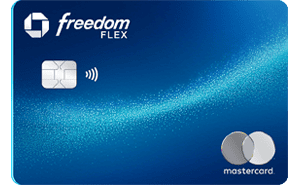
after you spend $500 on purchases in your first 3 months from account opening. Offer Ending Soon
Editors Note: Opinions expressed here are author’s alone, not those of any bank, credit card issuer, hotel, airline, or other entity. This content has not been reviewed, approved or otherwise endorsed by any of the entities included within the post.
10xTravel is part of an affiliate sales network and receives compensation for sending traffic to partner sites, such as CreditCards.com. This site may earn compensation when a customer clicks on a link, when an application is approved, or when an account is opened. This compensation may impact how and where links appear on this site. This site does not include all financial companies or all available financial offers. Terms apply to American Express benefits and offers. Enrollment may be required for select American Express benefits and offers. Visit americanexpress.com to learn more. All values of Membership Rewards are assigned based on the assumption, experience and opinions of the 10xTravel team and represent an estimate and not an actual value of points. Estimated value is not a fixed value and may not be the typical value enjoyed by card members.
Editors Note: Opinions expressed here are author’s alone, not those of any bank, credit card issuer, hotel, airline, or other entity. This content has not been reviewed, approved or otherwise endorsed by any of the entities included within the post.
bonus cash back
after you spend $6,000 on purchases in the first 3 months from account opening.
earn 75K bonus miles
once you spend $4,000 on purchases within 3 months from account opening.

bonus points
after you spend $5,000 on purchases in the first 3 months from account opening.
Membership Rewards® Points
after you spend $8,000 in eligible purchases on your new Card in your first 6 months of Card Membership. Welcome offers vary and you may not be eligible for an offer. Apply to know if you’re approved and find out your exact welcome offer amount – all with no credit score impact. If you’re approved and choose to accept the Card, your score may be impacted.